Sunday, 22 February 2009

Week 3 - Part 2 Si gains a body (of sorts, coz I may change it slightly!)

This is straight to the point time, I'm afraid, due to the excessive amount of blogshots I have taken, but then its only because theres alot to cover in creating Si's 'out-of-this-world' abode!


Once I had finished with Si's head, I decided that in order create the body I imagined in my head, I would need to 'extrude' and 'bevel' selected polygons from his head.
Firstly, due to his head being circular, I needed to select, with 'ignore backfacing' checked, a similarly circular area of polygons at the base of the head and flatten them out by shifting them upwards until they were almost parallel.
By doing this I then had a clean area from which I could accurately begin 'beveling' (I planned to use a repetitive process of beveling and extruding outwards and, as I went further down, his body would appear more bulbous and bloated.
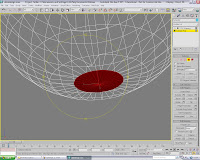
^The image shows how beneficial choosing a wireframe view is when a user is in the process of selecting so many individual polys and vertices!^
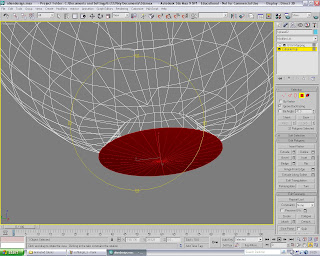

Once all the relevant polygons had been selected, I then chose the bevel tool and began to pull out the required amount of material from the wire-framed head of Si.
I was trying to create him into what would almost instantly be recognisable to a average viewer and giving Si this bulbous appearance, with exposed tentacles at the base of his body to aid his mobility (very 'sci-fi'!) and two short, stubby arms (that will possibly only have the wrists, shoulder and three-finger joints moving!), I feel that the persona he portrays with his facial features certainly displays an attitude of dislike of the situation, if only for these three scenarios...
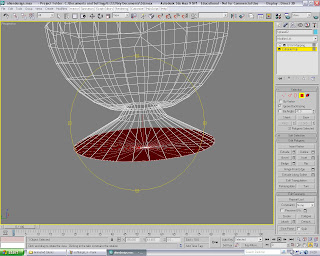
^As you can see, the 'bevel' tool allowed a greater degree of control over even the extrude tool, as I was able to pull the existing form outwards and create this almost canopy-like coverage as his body took shape the further I went along^
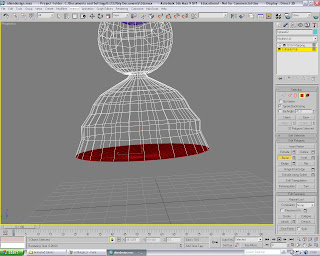

The process was actually a very interesting method in which an individual could almost create a whole 'form' from just a sphere, using the 'bevel' tool.
In the image, I have gradually tapered the shape and tried to be as uneven as possible, but also still intend on making the lower section as expansive as possible (a big foot/tentacle print!)
The only thing I was worried about at this point was that once I have re-selected the 'Mesh-Smooth' mod, would I just become a over-sized blob, with a disjointed and disproportionate head atop...
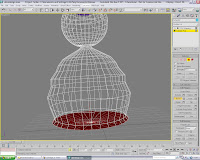

^The finished form of Si in wire-frame mode. At this stage I tried to create the tentacles, but unfortunately they weren't turning out the way I hoped they would, appearing as slim blocks sticking outwards, even with the 'Mesh-Smooth' mod on...^
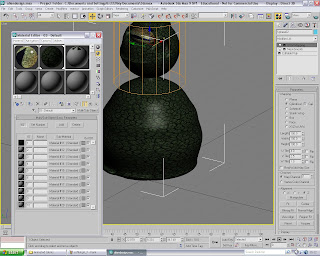

As stated in the title, this is the finished form, but I'm not completely happy with it(I may not have time to change it drastically, but it could just be a case of slimming and enlarging certain areas!)
Just at the base you can see the tentacles at their baby stage, even though it is pretty simple for me to revert to the 'Editable Poly' level and increase their length without too much hassle.
The texture used here is, of course, the same as whats on Si's head, and I do still feel its suits the overall effect and art-style of the Sci-Fi subject matter. And, again, the cylinder mapping parameter was used, but I unselected the 'cap' for the body to avoid discrepancies in his neck
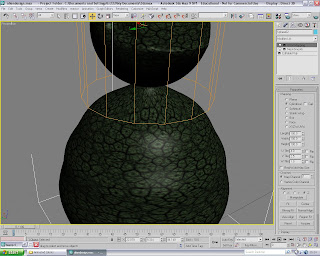
^Shown above is the example of why I un-checked the 'cap' within the cylinder map parameter - I may also point out the specular detail I added in to make Si's skin appear slightly moist or smooth enough to reflect any generated light sources I will be adding into the scenes...^

That is enough of Si for the moment; next post concentrates of the creation of the kitchen (and how well the mapping and lighting seemed to go for me, even if the creation of the archway needed to be restarted a couple of times!)

Thursday, 19 February 2009

Week 3 - A Storyboard (and a tutorial!)

*A tutorial will be shown nearer the end of this post* By now, I have decided on the three clear ideas of what my animations will include and they all involve a recurring theme of the alien and his housework/chores which he carries out in his house (apparently on the Moon!), where he also have a scenic view out of his kitchen window of Earth below him - I may include a window in the lounge as well so that it shows up in at least two of the Idents. This almost certainly gives the viewer a more believable edge to how possible this could be - especially watching the Sci-Fi channel!

The first will involve Si the Alien washing up in the kitchen. He will put a plate into the drying rack on the side and, (there are two possible versions: whichever is easiest!) as he goes to pull out the plug, the soapy water drains away and the soap suds left in the bowl will spell out Sci - Fi
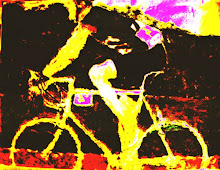
Here is a small storyboard to demonstrate;

The other two ideas involve Si in the lounge where, in the second, he is ironing a pair of his undercrackers, burns a mark into them, pulls up the iron and places it onto the ironing board, where the Sci-Fi channel title will appear at the bottom.
The last one, again in the lounge, Si will be either dusting or hoovering (I'm sure him dusting will be alot easier to demonstrate!) and, as he cleans, he will chuck up dust/dirt in the air and the titles will appear in either the air or on the floor/shelve surface.

I shall update the storyboards for these ideas as and when I continue...

The Tutorial

Creating characters which are intended to become animated means applying the use of bones to the characters limbs, thus allowing them to be manipulated. Each 'bone' that is created should be named appropriately as so to avoid any mistakes, as well as creating a series of 'bones' that are measured for your desired purpose e.g. a upper-arm and fore-arm, with a wrist joint and finger joints for a typical homo-sapient, but other characters may need other parts too...

^Upon choosing 'Mechanics' along the top menu, you are greeted with five options, with the 'bone' option chosen here. Using a 'click-and-drag' system, I created this string of bones that are immediately connected to each other, and act as if they were tokens part of a typical human arm ( options with this item include altering the dimensions of a particular bone and adding in 'fins' to any of them for ease of movement/selection, as well as adding bulk to the required limb is you should wish^

^ Creating a cylinder and lining it up against the upper-arm 'bone' (which, incidentally, I pulled upwards to straighten them out ready for this step!), I began to clone the cylinder the same number of times as there was 'bones', lining each one up against its requisite 'bone' (I also later learned that all I needed was one cylinder/cube per limb, rather than cloning several)^

^Ignoring the sentence I finished the last point with, the next I took was to integrate each cylinder with the bone I had lined it up next to - I had thought that having a separate object for each bone would have allowed a greater degree of flexibility, but this isn't that case (3DS Max is clever enough to contort a single object through many deformations, without the need for too many at once!)^

^Once the cylinders are lined up and all equal in spacing and are considered parallel, I then went to the modifier list and chose the skin modification, to which I was presented with the window of options on the right of the image above. I then went to 'Add' and selected the bones in the scene (you can see the easily-memorable names I gave them!) and clicked 'Select' - there are many check/un-check options of how to order the bones if there are many of you are not sure which have been used or not...^

^Finally, the 'Edit Envelopes' button. This handy tool allows precise alterations to each section of the cylinder that you have chosen and, as shown in the image, I have checked the fins options from the previous window to show how exactly the bones will change with this option engaged. The vertices and loops of the bones will alter in accordance and in direct relation with the envelope modifications - definitely a tool which can come in useful when their are alot of bones attached with the HI Solver ( a device which allows the joints of each of the bones to connect with each other, so pulling one up will directly alter the others in that chain...^

I will present a handful more posts within this week, especially since I have completed around 60% of Si and the Alien now, and since the stage for the animations contains two rooms, one of which will be used for two of the Idents, I may be able to say that the constructions of them are almost halfway too....

Friday, 13 February 2009

2nd Week - Part 2 The Creation of 'Si' (well,his head!)

As promised, you will now have the pleasure of understanding the lengthy process it took me to create my alien character. He is particularly special as he will be the only living item within each of the idents, so he will have to portray some semblance of physical and physiological intelligence (in other words, I gotta make him look as good as possible early on without too much hassle for later!)


I have a few sketches which I will show, and also the original image which definitely sparked an idea of which persona and attitude I was going to follow for him - as it happens, the disgruntled look suited his physical features pretty well, I feel


I think by my subsequent scribblings, its pretty plain to see how I intended to show the alien life form, even if it wasn't the most flattering, it certainly was the most enthralling aspect of the
project at this early stage!


Varied I know, but I felt it was necessary to give every possible idea a chance, even if a certain one wouldn't be easy to accomplish on in 3DS Max, but hey, that's what lecturers are for-to give you their honest opinion of whether something would work, and I have learnt to go with the most likely-to-happen design, which just so happens to look pretty good as well...


I then took my ideal template into Max and began to create my idea - which I can bet will develop more on-screen than what I had drawn out!


^ After creating two spheres, I adjusted the purple one with the 'squash-mod' resizing tool, which enhanced its appearance to appear as a more natural almond-shaped eyeball (this would then fit inside the socket I would create as the next step.

Also in this scene is the aqua-coloured sphere, which having adjusted a row of vertices' 3x4, it was able to push some of the material inwards to create the brow (afterwards, applying a 'smooth' modifier helped with the natural-appearance of a deeply,inset brow as you will see in the next image...)^


^ Now the brow has been created, I re-adjusted the eyeball into something similar to my original idea - almond-shaped and bulbous to an extent! I then managed to find a suitable texture for the eye (a monitor lizard's eyeball closeup) I then applied this Bitmap file to the 'diffuse-colour' channel, and began to alter 'specular levels', reflection and refraction properties of the texture so that it could appear to be moist and wholly plausible^


On the right-hand side is a description of the UVW map settings I used, which included, a this stage; a box map, as well as alterations to the default Max settings for the U, V and W tiling


^ This image is to show the slight alteration I made to the axis on which the texture was to be applied according to the UVW map, which I altered from X to Y, meaning the pupil was now on the horizontal, again appealing more to the odd nature of a being from outer space! To finalize this part, I also decided to apply the Bitmap to the several other channels as part of the default window; specular level, glossiness and the two translucency shaders - this allowed a greater level of detail in the texture (I believe it was in this image I had deliberately selected the 'faceted' property within the material library function, as to give the eye greater depth of realism...


Now that the eye has been rotated and given that specular highlight shown, I then wanted to add in the semblance of a mouth for Si.

Using a similar technique to create the eye socket, I pulled out a selected number of vertices, and pushed another selection downwards to create that scornful look. Adjustments such as this at the corners also improved this.


The 'subdivision-method' is now a 'quad-output' with adjustments made to iterations and smoothness


And now I moved onto the aliens skin texture, would would be used throughout his body. It was found through a search on the Internet, had just the right resolution without and need to crop, and so I Bitmapped it into Max, and began to repeat a similar process as with the lizards eye.

As the image shows, the target was to get as realistic as possible, with a high bump map and specular highlights in select places, but as the image shows, I perhaps had the incorrect parameter from which to start the adjustments (its too shiny even with reflection at 100)


^ Above is a much more appropriately-modified image, which shows how changing the basic parameter to Oren-Nayer-Blinn (giving the texture a more matte finish) really improves the scaly-rough texture I'm aiming for. Small alteration to the smoothness and glossiness levels, keeping roughness at 100, meant this is the ideal texture for Si! On the right, you see the settings for the Map, with the texture alignment on the Z axis and the box mapping parameter selected^


Unfortunately, even though I had thought I had got away with not having to faff around with alignments too much with the tiling of the skin texture, rotating the head around showed me that that tiling was all too obvious to ignore.


I then decided to save the settings before experimenting and, having done that, I then tried out other other UVW mappings. Cylindrical was interesting because while all round the face it was exactly what I was after, the top of the head was as shown, pulled together like a pinched piece of latex..!


I was going to go straight onto another setting but, in a strange twist, I saw the 'cap' option at the side of the point, and so clicked on it just to see what would happen.

As the image shows, I no longer had the crown of the skull pinched inwards and the texture just spread out evenly. And I even managed to highlight the drawn mouth a bit more with use of clever lighting!

Next week, I will finish him off...seems alot of work, I knwo, but once hes done, Si will appear without hesitation in whatever scenario I choose for him (even if he knows it could end in a way he wasn't expecting!!)

2nd Week - Part 1 Mighty Morphin'

This weeks lecture/tutorial was based on a video a past student had made on Morphing - a skill in 3DS Max which may come in handy for our animations...

Though initially complex, the students video was narrated and was easy to follow, meaning that everyone could get a hang on which buttons to press and which numbers to put in.


This is the method and objects which I used to demonstrate what I had learnt...


^Started off with a cylinder, named it 'green' and then cloned it as a 'copy' twice, naming the two copies 'red' and 'blue' respectively^

^ I then converted the red cylinder to an editable poly, went into sub-object level, selected vertices's, highlighted its upper section and then pulled it outwards, as the image shows^

^ As a direct opposite, I then followed the process as described above, but I pulled the lower section outwards, like so...^

^ I then returned to the green cylinder, selected the 'morph' option from the modifiers, where I was presented with the menu you see on the right side of the image above. I double-clicked on the first marker tab, and then the 'pick object from scene' button. This meant that I could click on the red cylinder, which added it to the marker tab, with the bar on the left going green to indicate its selected - this process was repeated for the blue cylinder

^I moved onto the next part. Selecting 'auto-key', I pulled the 'frame-bar' along to 50 and then pushed the percentage of morph next to the red cylinders marker tab up to 100% (this meant the green cylinder's upper half would mirror the movements of the red cylinder!)
I then moved the 'frame-bar' to 100 frames, again upping the percentage on the blue cylinder to 100% ( the green cylinder now has both section mirroring the respective coloured-cylinder)^


I could then alter the percentage of both of then along the timeline, so that the green cylinder would alter its morph-state to appear more or less like its clones

To illustrate my perhaps slightly convoluted explanation of what I learnt, I have included the video created with this process...


Friday, 30 January 2009

Week1 Part 2 - Research and Mood Boards!

Yep, its about that time again when mood/research boards are necessary, so it says here...

Ideally, looking around at the current standard for 'Idents' in televisual broadcasting and commercial advertising, giving a student a broadcasting outfit from which to progress from, in regards to research, is fairly helpful. In fact, the BBC has been creating 'Idents' for over 50 years, and that's before the word 'Ident' was even thought of!!

I, personally, wanted to go with a digital company that broad-casted programs that held my interest and also had a great deal of subject matter through that 'casted material I could put to use...

And so, having researched the BBC most recent batch of 'Idents' and created a board for them, I settled on creating animations for the Sci-Fi channel, a channel which has an extremely varied listing of programs, including updated Sci-Fi favourites such as Dark Angel and Medium, as well as brand-new seasonal shows like Eli Stone and Sanctuary...this isn't advertisement for them, honest - I'm just enthusiastic for the channel and this projects possibilities...

Right, the BBC's 'Idents' are the broadcasters chance to display the skills of some of the best (tele)visual entertainment-inspired media technicians creating some fantastic graphics and top-class photography and cinematography this side of Hollywood movies - I'm a big fan! The subjects they cover vary wildly, from awe-inspiring landscapes through to mystical faeires in woods through to Maisai tribes in outer Africa...

^The subject matter of the crop circles in the top left and the moon's surface scarred with pits and impact craters are definitely relevant to my chosen channel and its requisite material, but I will take these 'Ident' designs and begin to develop them into a style which will work with the Sci-Fi persona^


From what I have discovered, the Sci-Fi channel hasn't really had a very varied or substantial history of 'Idents' since its inception in the UK in 1995, and the montage I created is made up from the ones I could find - one of which was from the French version!

^As it is, the titles have barely altered either, with most of the imagery focused on contemporary photography of the outer-space orientated kind and this, coupled with more stereotypical UFO and planetary imagery, means that my ideas could in fact be possible for my proposition of a single, recognisable character within certain situations...^


The Mood Boards

After much deliberation, I have decided to choose the very idea that I had originally doubted when looking at the Sci-Fi channels choice of the familiar UFOs and "Your not alone" slogans; I want to create an alien/outer-world being dressed up as an 'Average Joe' (perhaps a baseball cap with the Sci-Fi logo on it as well!) He (It!?) will be in a set of three situations involving a monotonous and typically British task of housework - purely the idea that an alien could be doing these activities would most certainly draw the viewers attention, that's for sure!!


^This Ident relates to a scenario in which 'Si' the alien (its easier if I use that terminology!) is washing up and the channel titles appear in the soapy water in the bowl. In order to prove his humane qualities, yes he will be wearing marigolds too!
Its difficult for me to describing any emotional or psychological detail the differences between all three, but if the whole point of the Idents is to portray the channels sense of humour, willingness to try out subjects that haven't been tested, and promote their material,then I'm willing to give it a go...^


^A scenario related to 'Si' doing some ironing. This one, and the third down below, will take place in his lounge, so I have the chance to create an environment which could have all different and varied accoutrement's to do with outer-space or fashion an interest in astronomy - 'Si' could well be a character interested in learning where he came from, in actually fact!
The channel titles will appear on the iron's sole-plate, still red-hot after burning a hole in his shirt, which could also have the logo on it perhaps!^


^And, lastly, this is where 'Si' will be dusting away (perhaps clearing the dust from his shelf of model aircraft or Rolling Stone memorabilia...!) and, either he gets dust up his nose and sneezes, the dust flying into the room and the titles appearing as the dust floats around the room/settles again, or, in fact, he is merely wiping down the shelf and the areas he has wiped shows the Sci-Fi titles against the still-dusty areas^


I have quite a few ideas to be getting on with, but rest assured I will only go with them if they are perfectly plausible as flowing animations or won't require weeks worth of work, only for them to look gravely average at the end...tune in next week to see drawn sketches of possible designs, rather than have me babble once more, that not exactly constituting a worthwhile post, if I'm honest...


Thursday, 29 January 2009

2nd Semester - Something called 'Ident(ists)?!'

Animation in 3DS Max; not something I was expecting to find as accessible as I have so far. Even so, I've only just started today, but its definitely an aspect of 3DS Max which I should find exciting and creatively-stimulating!


I managed to create a short 6 second video during my time in the first tutorial, which I will show at the end of this post, but for now I will show the windows that I learnt would take me through each stage of the production process

The render window is, of course, initially identical to when you need to render static images on screen but, when an animation has been produced through key-frames and multiple tracks, there are a few options you need to change in order to output render correctly

Time output will be set to the files 'Active Time Segment' of however many frame are contained within the motion-capture, the output resolution needs to be selected also (I chose a equivalent QVGA res. of 640x480) and then all that needs to be done is save the file and finalize output through the .imsq path

Once the render button is chosen, it will take anything from 10 seconds to upwards of 90 seconds, depending on file size...

This image shows two important windows that ,although not completely necessary, are indeed provide important information throughout the process of constructing the animation.

The upper window is the 'Schematic View' which allows the user to display the relationships between the scenes entities (the on -screen objects), which are colour coded for quick-reference! This window is useful for analysing any entities that make up a complete item e.g. fingers made from bone,muscle etc

The lower screen allows the user to adjust the postion of all the key-frames and crucial moments in the animation and alter their properties

^ This is the window along the right-hand side of the screen which is used, as with static objects, to modify the shapes/forms of on-screen objects. The process by which you add modifiers onto the objects is only different by the use of the 'Set-Key' and 'Auto-Key' button underneath the timeline which will determine at which point the object will move or alter its form (this part confused me for a while but, almost by chance, I found out how it worked) ^


Now we come to the actual object itself...
Here I have my object, which has a marble-effect material on it, during the action of moving around the screen

This is visible due to the trajectory markers present in the image, markers which scale out the path which the objects take through all three-axis

The two-tone scheme, I believe, relates to the inner and outermost edges of the object and the path the take interdependently from each other
The next images follow in sequence...


^ The 'Squeeze' modifier was used to good effect here and the top of the object begins to pinch inwards and pull the form upwards into an almost bow-like shape at the top ^

^ I then used the 'Twist' modifier to achieve the curved shape underneath the object, as well as it gradually folding over itself as it began to swoop away from the camera ^

^ Finally, I used the 'Bend' modifier to achieve an almost witches-hat form to the shape as it distorted, bent over and hunched with a drooped peak on it ^

^ As the image shows, the rendered material also stretches and warps as the object changes shape which, in some instances, may be a disadvantage or not ^


To quote a certain individual in the room at the time I was creating this 'piece, my 'magical-moving-humbug' has been adorned with a typically relevant background too, even though the actual animation look ever-so slightly out of place on it...

My next post tomorrow will be the start of my project, in which I will be presenting a research board and usual text to explain my decisions, in addition to this I have three mood boards which will include imagery related to my chosen subject matter and any images which I feel add to the point I'm making (even if that point is vauge and not-so-crystal-clear as it could be!) Onwards and upwards, as they say...oh yes, the video>>


EDIT: Week 2: After learning about cameras and structured paths that can be created, thus allowing them to follow a set route, I decided to post a much improved animation on here (well, in truth, its a short camera fly-by of an interior that could come from the inside of a spaceship...if that space ship had a gigantic oversized teapot in a storage room perhaps...!